License Setup for NX Convergent Modeling
Convergent Modeling enables seamless integration of mesh geometry into the CAD workflow. It streamlines the use of scanned data, polygonal models, and topology-optimized results, while simplifying the preparation of mesh (STL) data for 3D printing (NX30289 and NX30710). Note, Wrap Mesh and Plug Leakage operations require an installed STAR‑CCM+ license.
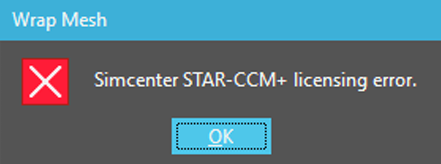
It is common to experience a Simcenter STAR-CCM+ licensing error when attempting to use this feature, as shown below.
NX30289 — NX Additive Design with Convergent Add‑on and NX30710 — NX Advanced Convergent Modeling license features are provisioned on a Simcenter STAR-CCM+ vendor daemon cdlmd, as shown below.
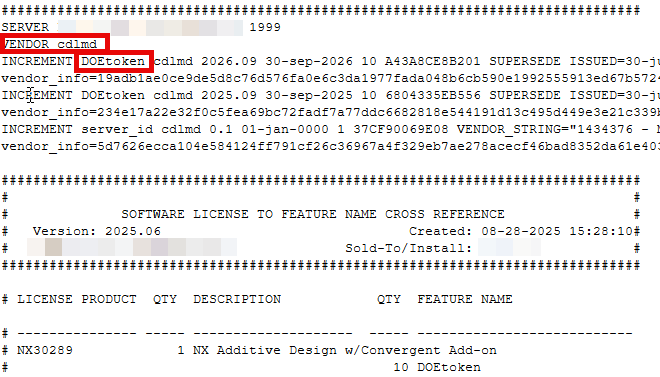
The NX license file is usually delivered with a ugslmd vendor daemon. To resolve this issue, follow these step-by-step instructions.
- Ensure you are running the latest version of the Siemens License Server.
- Linux: Siemens License Server Installation and Setup on Linux
- Windows: Siemens License Server Installation and Setup
- Add your cdlmd license file to the license server, Adding/Replacing a License File for the Siemens License Server.
- Create a new environment variable on the client machine attempting to connect to the license server named CDLMD_LICENSE_FILE and define it using the same definition as the NX environment variable (SPLM_LICENSE_SERVER) port@IP_address, typically 29000@IP_address.
Related Articles
NX Licensing and Installation Guide
NX is the award-winning software that helps designers and manufacturers deliver better products faster using powerful, integrated CAD and CAM solutions that realize the full value of the digital twin. This article will guide you through the process ...Creating the SPLM_LICENSE_SERVER Environment Variable
Newer version of NX relies on the SPLM_LICENSE_SERVER environment variable to locate the license server and retrieve the necessary license. Users can set this environment variable during NX installation or configure it manually later. To manually ...Selecting NX Bundle
NX allows users to select a specific bundle, whether they own one or more bundles. However, NX sometimes does not auto-detect the NX bundle and displays an error message as follows: Solution: Step 1. Visit the start menu of Windows. Select All. Step ...How do I download NX?
Please follow these step-by-step instructions to download NX in Support Center: 1. Login to the Siemens Support Center. Create an account if necessary. 2. Select NX. If you do not see NX under Product Centers, please see Siemens Support Center ...Mastering the New Siemens NX Sketcher: Introduction of Sketch Concepts & Functionality Webinar
What is in this webinar? This session is designed to help you smoothly transition from the legacy Sketcher to the new and improved Sketch environment. We will cover the key updates that make sketching faster, smarter, and more intuitive, including: ...